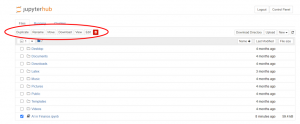
- Select a file/folder by clicking on the checkbox on the left.
- Relevant options will appear at the top.
- Click on the ‘Rename’ button.
- Write a new name in the dialogue box.
- Click the ‘Rename’ button to complete the action.
Currently open file can be renamed by clicking on the file name in the title bar and following steps 4 and 5 from above.
A running notebook must be shutdown before it can be moved.
- Select a file/folder by clicking on the checkbox on the left.
- Relevant options will appear at the top.
- Click on the ‘Move’ button.
- Provide the path of the destination folder in the dialogue box.
- Click the ‘Move’ button to complete the action.
A folder must be empty before it can be deleted.
- Select a file/folder by clicking on checkbox on the left.
- Relevant options will appear at the top.
- Click on the bin icon.
- Confirm the action to delete a file/folder by clicking on the ‘Delete’ button.
- Multiple files can be deleted at once by selecting them all at once in the step 1.